Neapolitanischer Pizzateig
Kommentare deaktiviert für Neapolitanischer Pizzateig


XAMPP Install XAMPP (https://www.apachefriends.org/de/index.html) to the directory „C:/xampp“ Open Config of Apache (File: httpd.conf) Enter the root directory of the web server (localhost) at DocumentRoot Open Shell in XAMPP Control Panel Run the command: Open „C:\xampp\phpversion.txt“ in a text editor Copy the whole content of the file Go to the… Read more »
https://www.home-assistant.io/docs/mqtt/discovery/ https://chrigi.me/wordpress/configuration-of-tasmato-devices/#Activate-Home-Assistant-automatic-discovery https://tasmota.github.io/docs/Home-Assistant/ https://www.home-assistant.io/integrations/light.mqtt/
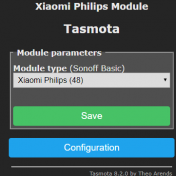
Unique configuration of each Tasmato Device Open the webserver of the module by enter the IP address in a browser Go to Configuration –> Configure Other Set Friendly Name 1 to a custom name Enable MQTT, if you want to use it Save the configuration Go to Configuration –> Configure… Read more »

Connect a USB to UART adapter to the module Connect a simple USB to UART adapter to the Sonoff module (Attention: Make sure it is a 3.3V adapter or the jumper is set to 3.3V. 5.0V will damage the module) I used this adapter: USB zu TTL konverter UART modul… Read more »
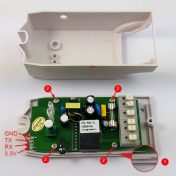
Connect a USB to UART adapter to the module Connect a simple USB to UART adapter to the Sonoff module (Attention: Make sure it is a 3.3V adapter or the jumper is set to 3.3V. 5.0V will damage the module) I used this adapter: USB zu TTL konverter UART modul… Read more »

Install Arduino IDE (https://www.arduino.cc/en/main/software) Integrate ESP8266 board in IDE Open Arduino IDE Open File → Preferences (Arduino → Preferences on Mac) Insert the in the textfield Additional Boards Manager the url:http://arduino.esp8266.com/stable/package_esp8266com_index.json and select OK. Open the Board manger under Tools → Boards… → Boards Manager… Scroll to esp8266 by ESP8266 Community and click on it. Install the last version Download the newest Tasmota source code… Read more »